

Whiteboard videos can be more than educational content.
They can also help businesses explain products, introduce services, demonstrate solutions, and communicate marketing messages.
InstaDoodle is designed to simplify this type of video creation with doodle assets, templates, AI-assisted tools, voiceover features, and different video formats.
But how can marketers actually use it?
Here are practical ways to use InstaDoodle for marketing in 2026.
Why Use Whiteboard Videos for Marketing?
Marketing often requires explaining something quickly.
A potential customer may not immediately understand what a product does or why it solves a particular problem.
A short animated video can turn that explanation into a visual story.
Whiteboard animation can be useful for:
- Product explanations
- Service demonstrations
- Landing pages
- Social media content
- YouTube marketing
- Affiliate marketing
- Online advertisements
- Business presentations
- Customer education
The objective should always be clear.
The video should help the viewer understand the offer and what to do next.
1. Create Product Explainer Videos
An explainer video can show what a product does without relying on a long written description.
A simple structure is:
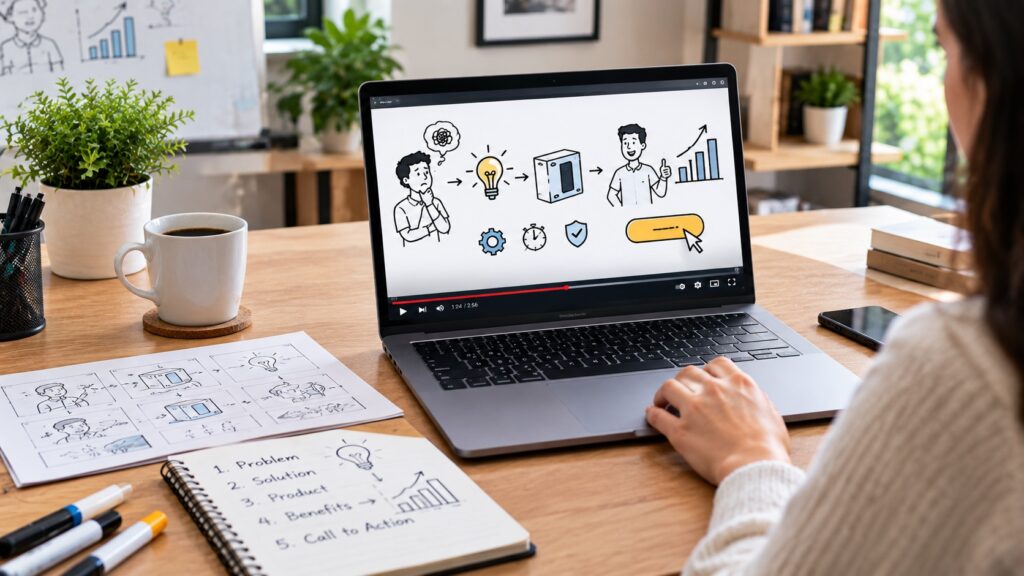
Problem → Solution → Product → Benefits → Call to Action
For example, imagine a software product that helps small businesses automate repetitive tasks.
The video could first show the problem.
Then it could introduce the software as the solution.
Finally, it could demonstrate the main benefits.
This makes the product easier to understand.
2. Explain Complicated Services
Some services are difficult to describe with a few sentences.
Whiteboard animation can break the service into simple steps.
For example, a marketing agency could explain:
- The customer’s problem
- The agency’s process
- The work performed
- The expected outcome
- How to get started
The visual sequence can make the process easier to follow.
3. Create Affiliate Marketing Videos
Affiliate marketers can also use whiteboard videos.
Instead of simply saying that a product is useful, you can create a short video explaining the problem it solves.
For example, a video about an email marketing platform could explain why businesses struggle to manage subscribers and campaigns.
The product can then be introduced as one possible solution.
The video can direct viewers to a detailed review or comparison article.
This approach can be more useful than simply creating an advertisement.
4. Turn Blog Posts Into Videos
One of the easiest ways to create more marketing content is to reuse existing content.
A blog article can become a short animated video.
For example, a 1,500-word article about a software tool could become a three-to-five-minute explainer.
The process could be:
Blog post → Script → Scenes → Voiceover → Video
You do not need to include every paragraph.
Select the most important points.
This can help you create additional content without starting from zero.
5. Create Social Media Content
Short animated videos can also be adapted for social media.
InstaDoodle supports multiple aspect ratios, which can make it easier to prepare content for different platforms.
You could turn one marketing idea into:
- A horizontal YouTube video
- A vertical short video
- A square social media post
The message can remain similar while the presentation changes.
6. Create Landing Page Videos
A landing page has a limited amount of time to communicate its message.
An explainer video can help visitors understand the offer quickly.
A useful landing-page video can answer three questions:
What is the problem?
How does the product solve it?
What should I do next?
Keep the video focused.
The goal is not to explain every feature.
The goal is to help the visitor understand the value of the offer.
7. Use Videos to Explain Software
Software products often contain many features.
Listing every feature can overwhelm potential customers.
Instead, choose one important problem.
Then show how the software addresses it.
For example:
Problem: Managing several repetitive tasks takes too much time.
Solution: Use automation to handle routine work.
Result: More time for higher-value tasks.
A simple visual story can make the explanation easier to understand.
8. Create Customer Onboarding Videos
Marketing does not stop after someone purchases a product.
New customers also need to understand how to use it.
Short animated onboarding videos can explain:
- How to get started
- Where to find important features
- How a process works
- Common beginner mistakes
- What to do next
These videos can reduce the amount of repetitive explanation required from a business team.
How to Create a Marketing Video With InstaDoodle
Step 1: Identify the Customer’s Problem
Start with the problem rather than the product.
Ask:
What does my audience need help with?
This creates a more customer-focused message.
Step 2: Define One Marketing Goal
Your video might be designed to:
- Generate leads
- Explain a product
- Increase conversions
- Promote a service
- Educate customers
- Send visitors to a landing page
Choose one main goal.
Step 3: Write a Short Script
Avoid turning the video into a product manual.
Focus on the information that supports your marketing goal.
Use simple language.
Step 4: Build the Story
Divide the script into scenes.
Each scene should have one purpose.
For example:
Scene 1: Introduce the problem.
Scene 2: Show why it matters.
Scene 3: Introduce the solution.
Scene 4: Explain the main benefits.
Scene 5: Present the next step.
Step 5: Add Visuals
Use characters, objects, text, and doodle elements to reinforce the message.
InstaDoodle provides a library of ready-made visual assets and AI-assisted tools that can help you create additional visual content.
Do not add visuals simply to fill empty space.
Every visual should contribute to the story.
Step 6: Add Voiceover
A clear voiceover can make a marketing video easier to follow.
Use a natural tone.
Avoid sounding like you are reading a sales page.
The goal is to explain the value of the product rather than overwhelm the viewer with promotional language.
Step 7: Add a Clear Call to Action
Tell the viewer what to do next.
Examples include:
- Learn more
- Visit the website
- Read the full review
- Request more information
- Compare the available plans
Use one primary call to action.
Too many choices can reduce clarity.
How to Make Whiteboard Marketing Videos More Effective
Focus on the Customer
Talk about the problem the customer has.
Do not make every sentence about your company.
Show Benefits, Not Just Features
A feature describes what a product has.
A benefit explains why the customer should care.
Keep the Story Moving
Avoid spending too much time on introductions.
Move quickly toward the problem and solution.
Make the Call to Action Obvious
Do not leave the viewer wondering what to do next.
Test Different Versions
If a video is used for marketing, consider testing different hooks, introductions, or calls to action.
A small change can sometimes make a meaningful difference.
Is InstaDoodle Good for Affiliate Marketers?
It can be useful for affiliate marketers who want to create educational or promotional video content around digital products.
For example, an affiliate website could create a video explaining a problem and then introduce a relevant software solution.
The video could then send viewers to a detailed review on the website.
This creates a content path:
Video → Blog Article → Product Information → Affiliate Offer
This can be more useful than sending every viewer directly to an affiliate link.
The important rule is to be transparent about affiliate relationships and avoid making unsupported claims about products.
Common Marketing Mistakes to Avoid
Making the Video Too Promotional
A useful explanation is usually more valuable than a long sales pitch.
Trying to Explain Everything
Choose the information that matters most to the viewer.
Using Too Much Text
Let the narration and animation do most of the explaining.
Forgetting the Audience
A technically impressive video is not useful if it does not answer the audience’s questions.
Ignoring Mobile Viewers
Make sure text and important visuals remain readable on smaller screens.
Final Verdict
InstaDoodle can be used for more than traditional whiteboard animation.
Marketers can use it to create product explainers, service demonstrations, affiliate marketing videos, landing-page content, social media videos, and customer education.
Its combination of ready-made doodle assets, templates, AI-assisted tools, voiceover features, and different video formats can simplify the production process.
However, good marketing starts with the message.
Before opening the editor, identify the audience, understand the problem, choose one marketing goal, and write a clear script.
Then use animation to make that message easier to understand.
If you are considering InstaDoodle for marketing projects, our InstaDoodle Pricing 2026: How Much Does InstaDoodle Cost? guide can help you review its current pricing before choosing a plan.
You May Also Like:
Leave a Reply
You must be logged in to post a comment.